Wednesday, May 17, 2017

Guidance for WannaCrypt attacks


Users who are running supported versions of the operating system (Windows Vista, Windows Server 2008, Windows 7, Windows Server 2008 R2, Windows 8.1, Windows Server 2012, Windows 10, Windows Server 2012 R2, Windows Server 2016) will have received the security update MS17-010 in March. If customers have automatic updates enabled or have installed the update, then you are safe. 

If you have an out-of-date system, please follow the guidance on the follwing link to harden your system - How to enable and disable SMBv1, SMBv2, and SMBv3 in Windows and Windows Server.

Tuesday, May 16, 2017

Introducing the Azure app public preview

Well, if you ask me it was about time for this app. For all those Azure admins out there, there is a new app (currently in Preview) for managing you Azure resources and subscriptions.

The Azure App will enable you to check status and critical metrics of your Azure resources, get notifications and alerts about important health issues, perform simple operations to resolve common issues and run Azure Cloud Shell scripts in the app (coming soon).


Multiple subscriptions

The app will enable you to consolidate and aggregate all Azure subscriptions you currently manage.  Each resource includes the following information (if applicable):
  • Status
  • Number of errors in the past week with a link to the full activity log
  • Important properties (Essentials)
  • Key usage metrics
  • Related resources
  • All resource properties
In case you manage more than one subscription, and it gets cluttered, there is also an option to put them in Favorites

Personalized notifications and alerts

By opening the Notification hub, you will be always up to date with the current status of the resources within your subscription. The health alerts include:
  • Status
  • Link to the impacted subscription
  • Latest communication details
  • Tracking ID unique to the event
  • List of impacted locations
  • List of impacted services
  • Brief history of the status over the past week
In addition to this, you will always have available the custom resource alert rules in the list. Each metric alert includes:
  • Status (activated or resolved)
  • Link to the related resource
  • Description of the alert rule, if specified
  • Brief history of the status over the last week


Quickly resolve common issues

You will be able to get help in resolving common issues, directly from the Azure app itself:
  • Suspend and resume Analysis Services servers
  • Open the API Management portal in the browser
  • Start, stop, and restart App Service web apps and deployment slots
  • Start and stop App Service environments
  • Restart all App Service web apps in a plan or environment
  • Open App Service web apps and deployment slots in the browser
  • Start and stop Content Delivery Network endpoints
  • Start, stop, and swap cloud service slots
  • Open the HDInsight portal in the browser
  • Open Log Analytics workspaces in the Operations Management Suite app
  • Enable and disable Logic App workflows
  • Enable and disable Scheduler job collections
  • Start and stop Stream Analytics jobs
  • Start, stop, and restart virtual machines
  • Connect to Windows virtual machines using the RDP app
  • Start, stop, and restart virtual machine scale set instances
  • Open Visual Studio Team Services accounts in the browser
Last, but not least of the functionalities which will come soon will be the ability to run Azure CLI or PowerShell commands trough the Azure Cloud Shell workspace. By starting a session from the portal it enables you to continue your work later. The Cloud Shell will preserve your code, configuration, and activity in your $Home directory across sessions and across devices.

Currently, the app is available for Apple and Android devices, with Windows Store app coming soon.

Manage Office 365 Videos


The more advanced features of Office 365 admin center is used to send/recieve mail, use calendar and manage contacts, manage documents (intranet portal and/or personal storage), as well as maintain your subscription (billing, services etc). Trough the videos, you will learn how to get to the Office 365 admin center and learn about available features and settings.

2. Manage documents (3 videos)
3. Chats and meetings (3 videos)

Monday, May 15, 2017

Office 365 Admin Videos

The Office 365 admin center is used to set up your organization in the cloud, manage users, manage subscriptions, and much more. Trough the videos, you will learn how to get to the Office 365 admin center and learn about available features and settings.


For all you othere, trying to get arrount Office 365 Administrative taks, here is a  set of usefull videos to give you basic heading:

1. Admin Center Overview (5 videos)
2. Setup an Domain (3 videos)
3. Manage people (3 videos)
4. Get Software (3 videos)


Saturday, May 13, 2017

WannaCrypt ransomware worm

Yesterday (May 11th), it has been a serious number of countries with clients affected by the WannaCrypt ransomware.

Few months ago Microsoft issues a Security Bullentin on how to disable SMB1 - https://technet.microsoft.com/en-us/library/security/ms17-010.aspx, and this attack is speciffically aimed towards old and unpatches systems like Windows 7 and Windows Server 2008 (or earlier OS) systems, so Windows 10 PCs are not affected by this attack. It goes wven further and majority of affected systems are Windows XP and.or Windows 2003.

There for, Microsoft issued guiadence as wel las  set of patches for all affected systems.

More information regarding the WannaCrypt, can be found on the follwing page - https://blogs.technet.microsoft.com/mmpc/2017/05/12/wannacrypt-ransomware-worm-targets-out-of-date-systems/.

Thursday, May 11, 2017

Microsoft BUILD 2017


In Seattle, from May 10th - 12th, Microsoft is hostin the annual BUILD conference. The conference is primarily aimed towards developers, covering various aspect of Microsoft cloud platform (Office 365, Azure) and tools for it.

You can wath the live streams and/or recordings on Channel 9 following link: http://soc.fm/RiXn1gik as well as follw what's going on on Twitter via hastag #MSBuild.

The wrap up of Day 1 can be seen on the following link.

Sunday, May 7, 2017

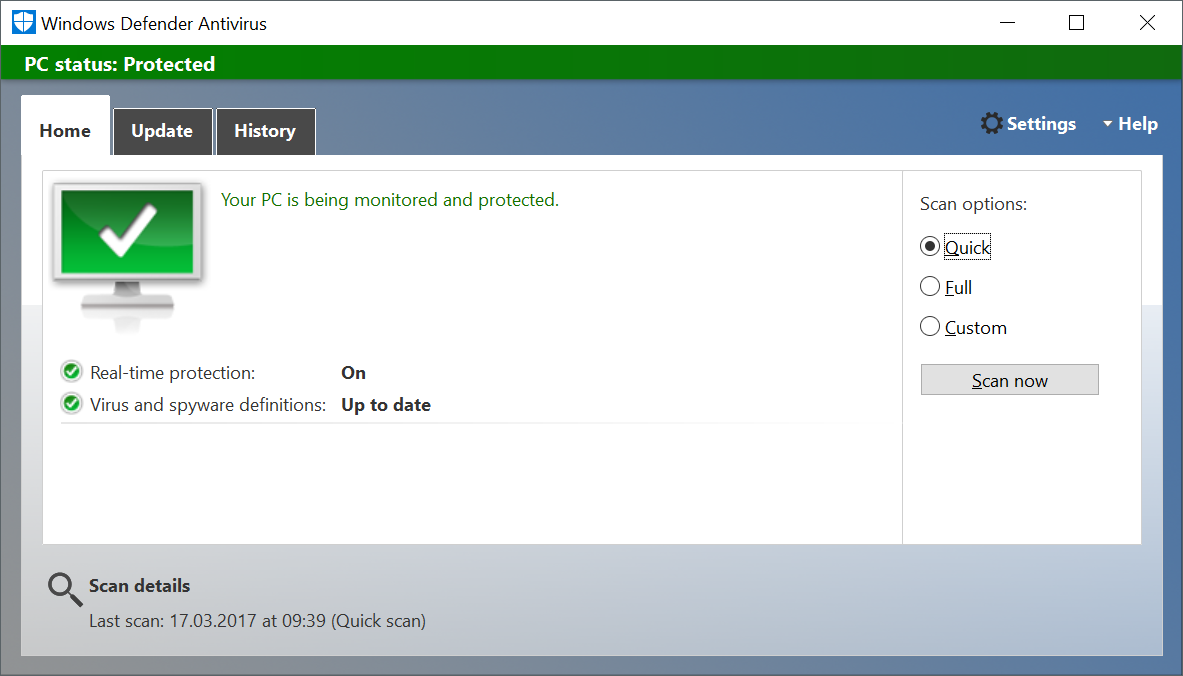
Windows Defender keeps turining on/off (Windows 10)

After removal of a 3rd party antivirus, the built-in Windows Defender anti-virus program just kept turning on and off. After trying several registry cleaners and reboots (to remove leftovers of the previous anti-virus program), the situation still was the same.


The proper way to fix this is:
  1. Press Windows key + R. This will open Run.
  2. In Run dialog box, type 'regedit' and hit enter. This will open Registry Editor.
  3. In Registry Editor, navigate to HKEY_LOCAL_MACHINE\SOFTWARE\Policies\Microsoft\Windows Defender.
  4. If you see a registry entry named DisableAntiSpyware, then change its value to 0. If you don't find this registry key then add this it. To do that, right click on Windows Defender key and go to New > DWORD. Give this DWORD name 'DisableAntiSpyware' and value 0. Registry will then look like this:
After few seconds, the Windows Defender service will start and remain active.


Thursday, April 20, 2017

C+E University: Azure Sales Webinars


If you are interested, there is undergoing series of sales webinars on Azure, organized
by Cloud and Enterprise Partner University.

They cover different topics, from Hybrid cloud management, Open Source on Azure, Business continuity, SAP Deployment, Client discussions, Datacenter modernization, Enhanced development and testing, Sales scenarios, Value propositions and success stories.

You can either watch the sessions that were already held, or you can register to the upcoming ones.

Bulk registration address: https://infopedia.eventbuilder.com/index?landingpageid=7M76lV

Wednesday, April 19, 2017

What’s new in the Windows 10 Creators Update for IT professionals


If you are interested to learn what is new in Windows 10, version 1703 (code name: Creators Update), you can enroll on the webinar on April 27th, that will present the latest imrpovements in:  Windows Defender Advanced Threat Protection (ATP), IT features for management and deployment, Windows Analytics insights, UEFI conversion, mobile application management feature, and improvements in Windows as a service model.

Speakers: Nathan Mercer (Senior Marketing Manager); Michael Niehaus (Director of Product Marketing)
Time: 19:00 - 20:00 (CET)


Tuesday, April 18, 2017

Global Azure Bootcamp 2107

On April 22nd, all around the world different user groups and communities will host 5th Azure Bootcamp event. It's a free one-day training event - sessions and labs based on materials from Microsoft or custom content. The event has been originally designed by 5 Microsoft Azure MVPs in order to benefit the local community members and teach essential Microsoft Azure skills and know how. While supported by several sponsors, including Microsoft, the event is completely independent and community-driven. Our goal is to provide the catalyst for Azure communities to grow around the world, not just for this one day, but year round. It will be held on 255 locations world wide.

More info can be found on the main site Global Azure Bootcamp 2017, but if you are searching for a location near you just follow this link Locations. you can follow the event on Twitter via #GlobalAzure.

Thursday, April 6, 2017

The case of mistaken location of User folder


Since Windows 2000, users are able to change location on several user profile folders, such as Application Data, Desktop, Documents, Pictures, Videos,  Downloads, Music and Start menu.

I had an inquiry from an user, who while trying to change location of their Pictures folder, by mistake selected the whole drive C: (system drive) as location in the Properties tab.


While trying to Restore to Default or move it to another section, the process gets started, but due to existence of several hidden/system folders and sub folders on the system drive, the process fails.

In this case, there are few options, out of which none is that time effective or easy to be done. But, there is simple Registry "hack" you can perform to reset back to default settings.


Important: This section, method, or task contains steps that tell you how to modify the registry. However, serious problems might occur if you modify the registry incorrectly. Therefore, make sure that you follow these steps carefully. For added protection, back up the registry before you modify it. Then, you can restore the registry if a problem occurs. For more information about how to back up and restore the registry, click the following article number to view the article in the Microsoft Knowledge Base: 322756 How to back up and restore the registry in Windows

With that said, and after you have done your backup (registry and the file folder content you want to move), you should do the following:

  1. Click Start, then type RegEdit and hit Enter;
  2. Registry editor will open, and then search for: Computer\HKEY_CURRENT_USER\Software\Microsoft\Windows\CurrentVersion\Explorer\User Shell Folders
  3. Here you will find all the User folders (as mentioned at the beginning) with their respected locations.
  4. In the top layer of the list (just after (Default.) entry), you will find several keys who's names contain series of numbers and letters and data is representing different locations on disk where the actual folders are located.In this case we were searching for the location of the Pictures folder that was represented with Value data: %SYSTEMDRIVE%\ (as shown on the picture, marked with yellow)
  5. Delete the line from the registry, and then find the key My Pictures, Double-click to edit and change the Value data: %USERPROFILE%\Pictures
  6. Click OK to save, close everything and reboot;
  7. The Pictures folder will reset to default value, and appear in its pre-defined location under User profile.
After this, you ca nrecover the data from backup in the folder and user could finalize the process of changing location of the folder on different drive. This work around will apply for any of the User folders, in case you make similar mistake.


Macedonian ITPro User Group Meeting (February 2021)

For this months meeting, as planned with  with   Gorana ,  Vlatko  and  Vladimir ,  I did a session titled "Microsoft Azure Security Pr...